Templates in RSX Engine are the solution for creating reusable, modular assets. A Template can be easily instanced to quickly create complex configurations or hierarchies of Scene Objects, much like Prefabs in Unity or Blueprints in Unreal. A Template captures a group of scene objects (with their components, transforms, and nested structures) into a single, savable, editable and versioned @rsx.Resource. You can instantiate it multiple times in a scene, override properties on individual instances, and even add new child objects without breaking the original Template.
Template nesting lets you embed one Template inside another for deeply modular designs (e.g., a "Wheel" Template nested in a "Car" Template). Plus, changes to the master Template can automatically propagate to instances while preserving your custom "overrides" (like a tweaked rotation or added @rsx.Component). If you need full independence, simply "break the link" to turn an instance into standalone scene objects.
Templates are excellent to abstract complexity or make level creation easier: from buildings and characters to props and entire city sections, everything can be a Template! They're stored as resources in your Library, making them easy to version, edit, and instance in a scene.
¶ Creating a New Template in RSX
In this section, we're going to learn how to quickly create our own Template and instance it in the scene. We'll override properties of our instance and modify the template.
As in the previous chapter, it is assumed that you have the "First Person Camera" tutorial open in RSX.
¶ Step-by-Step
- Build Your Hierarchy
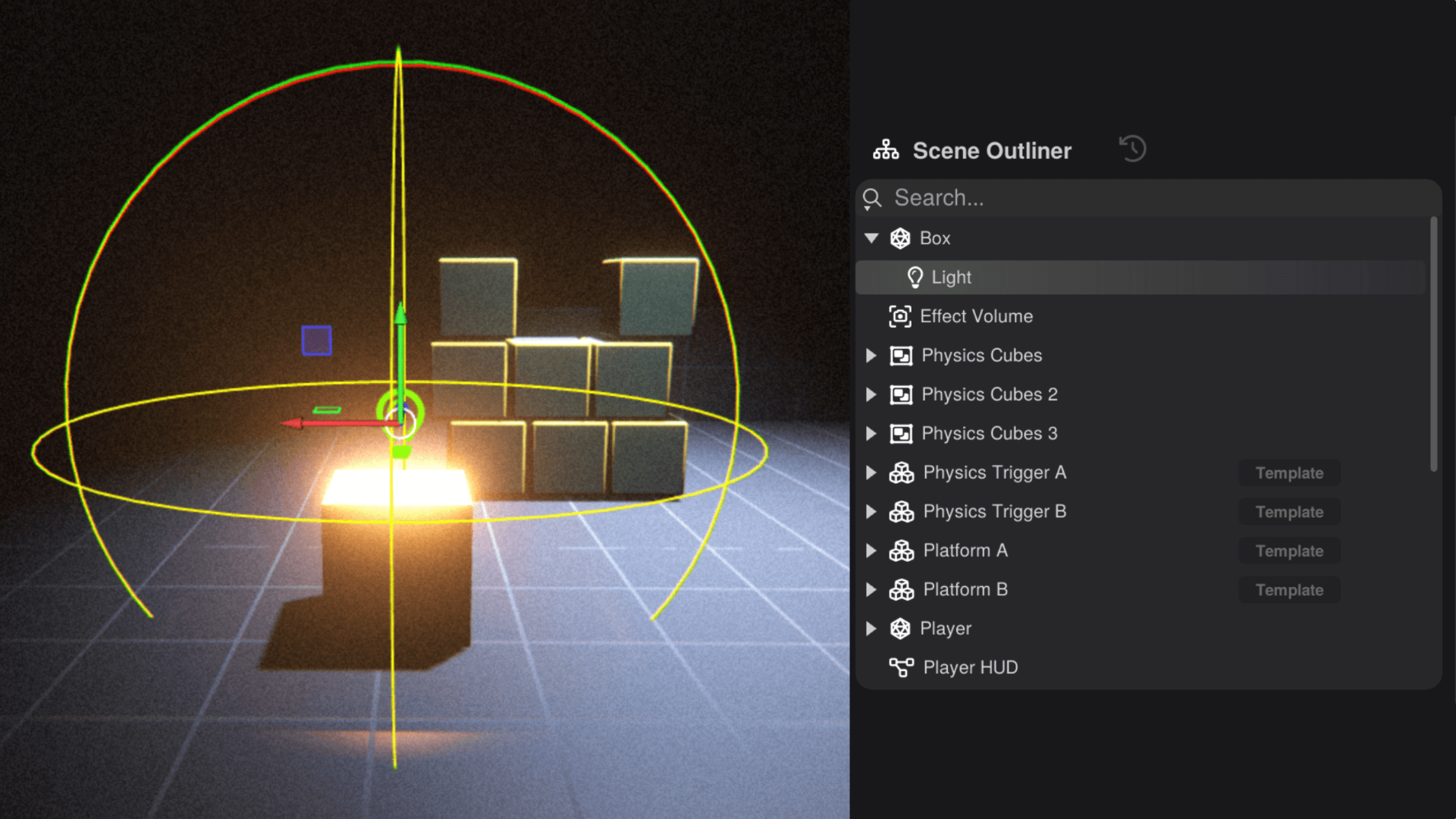
- In the Scene Editor, create a box using the Keywindow sidebar.
- Select the new Scene Object and rename it to
Boxusing the Scene Object Inspector. - Add another Scene Object and add the @rsx.Light component to the child and name it
Light. - Move the
Lightup and centered over theBox, so it neatly illumates the box and the world around it.- Note: To have the light cast shadows, enable "Shadows" in the Scene Object Inspector when the light is selected.
- Use the Scene Outliner to organize the parent/child (Box/Light) relationships by dragging the light onto the box in the tree.
- Convert to Template
- Select the
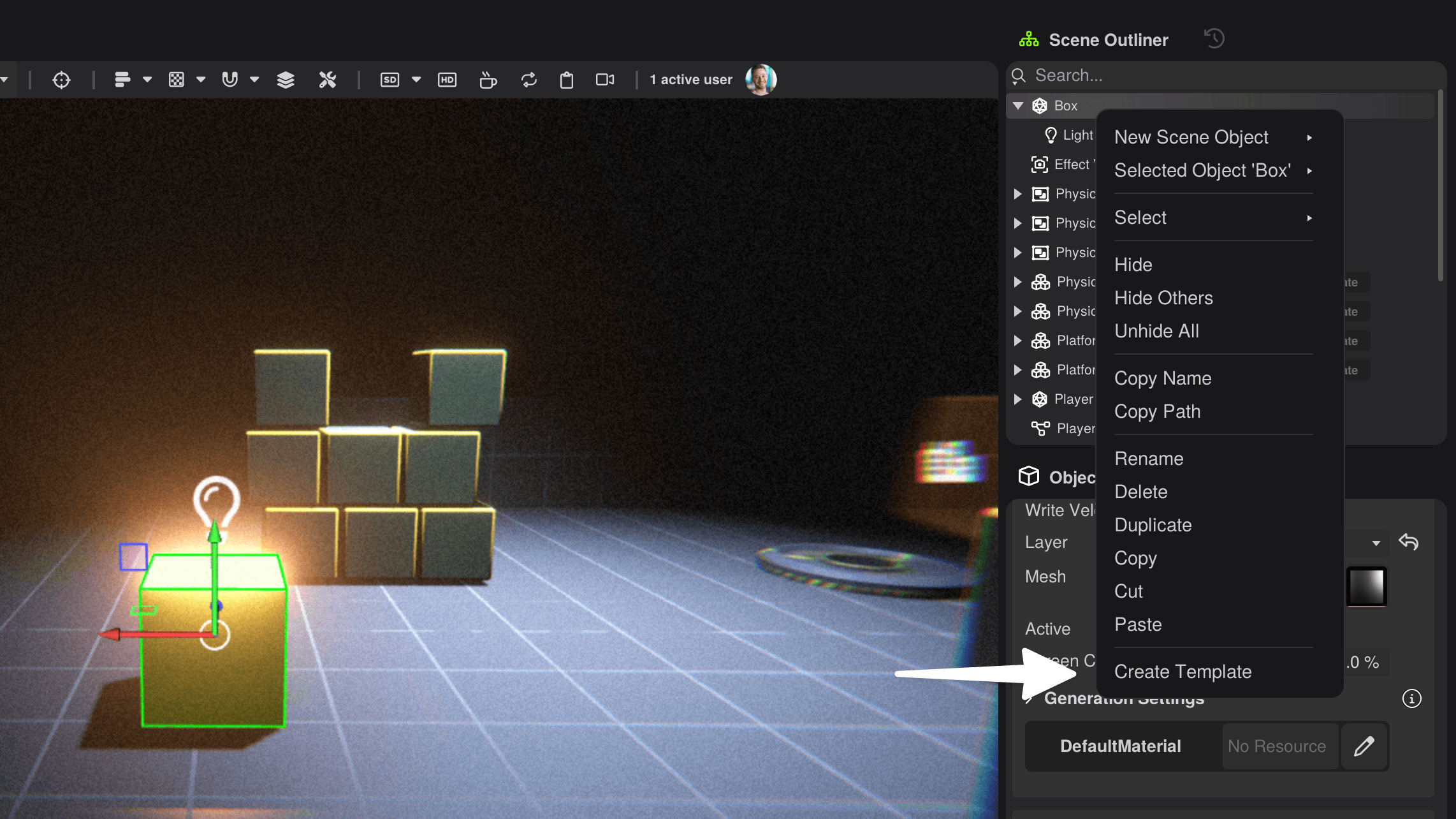
BoxScene Object (the top-level parent). - Right Mouse in the Scene Outliner → Create Template
- or,
MenuFile → Create → New Template from Selection. - or, Right Mouse in the Scene Editor → Create Template
- or,
- A dialog will appear, asking where to save the new Template resource. Enter a name for your new Template e.g. "Illuminated Box".
- Click Save, RSX now creates a Template in the project library under your chosen path.
- The
Boxobject will automatically be converted to an instance of the newly created Template!
- Select the
- Instance the Template
- Locate your newly created template in the Library window.
- Mouse Drag the template into the scene and release the mouse.
- A new instance was just created and you now have two instance of your Template in the scene.
- Repeat the process once more, so you have three templates in the scene.
- Overriding Properties
- Select one
Lightof one of your template instances in the scene. - Change the
Color Modeproperty in the Scene Object Inspector toRGB. - Adjust the
Color RGBby clicking the field and selecting a blue color.
- Select one
- Update the Template using the Template Editor
- Double click the Template resource in the Library window to open it in a new tab. Your previous tab remains active and you can switch between the new Template Editor Keywindow and your scene by click on one of the tabs.
- The light is only faintly visible, because of the bright sky.
- Find the
SkyScene Object in the Scene Outliner of the Template Editor. Select it and press H to disable the sky, or click the icon when hovering over theSky. - Change the light color similar to 4., however, this time make the
Color RGBred instead of blue. - Save Ctrl/Cmd + S
- Update the Template using the Scene Editor
Besides editing the Template using the dedicated Template Editor keywindow, it is also possible to directly edit and save Templates in the Scene Editor. This allows you to perform quick changes, in the context where the template is used.
- Select a
Lighttemplate instance without the blue light override in the Scene Editor. - Change the
Color RGBproperty of theLightto a green color. - Press the
Save Templatebutton in the Scene Object Inspector. - All template instances are now automatically updated, the overrides are preserved.
For imported meshes (e.g., FBX characters), RSX can automatically create a Template during import. In the import dialog, enable Create Template to get a ready-to-use hierarchy with materials, skeletons, and animation clips assigned.
¶ Nest Templates for Powerful Modularity
Nesting templates lets you compose larger templates from smaller building blocks, without limitations on the nesting depth. This enables you to abstract complexity, by compartmentalizing behaviors and component configuration.
To build a group of AI Agents or NPCs a single template called NPC Group can be created, that instances multiple AI Agent templates.
Another situation might be creating a Building template from several Floor templates and a Roof template. Then taking the Building template and instancing it in a City Block template that also instances a Street and Bench template. To further this concept, the City Block template could be instanced several times into a City District template.
¶ Breaking the Template Link
Breaking a template link can be usedful, to avoid changes from the underlying to propagate to the Scene Object, when the template is reinstanced upon changes.
Breaking the template link of a Scene Object can be done in several ways:
- Select the Scene Object in the Scene Editor or Scene Outliner.
- Click the Break Link button in the Scene Object.
OR
Right Mouse in the Scene Editor on your Scene Object and select Break Template Link for Scene Object
It can also be done using the Scene Outliner:
- Right Mouse your Scene Object in the Scene Outliner.
- Select Break Template Link for Scene Object.
¶ Best Practices and Tips
Templates are at the hear of RSX Engine. They can be automatically created when you import a mesh, or setup quickly from the Scene Editor or Scene Outliner.
- Create templates to abstract setup for your Scene Object.
- Override properties such as materials or component values on your template instances. Overrides will remain active, even when the template is resaved and reinstanced on the Scene Object.
- Nest templates to create larger set pieces.
¶ Next Steps
🥳 Congratulations! You are now familiar with the powerful template system in RSX. Use it to build complex abstractions that you can quickly instance, and reuse in different scenarions by using overrides. Next, we're going to learn how to turn our RSX Editor Project into a standalone application.