RSX Engine is built for teams from the ground up, making it easy to collaborate in real-time without the headaches of traditional 3D development workflows that slow down development and iteration progress. Whether you're a small indie team, a large studio, or an enterprise group working on XR experiences: RSX's cloud-native architecture handles realtime collaborative scene editing, instant asset synchronization and replication, and Git-like versioning seamlessly.
Collaboration is exclusive to Cloud Projects (the default for new projects), while Local Projects are single-user only and must be versioned manually using a tool like Git or SVN.
Creating "Local Projects" requires a Teams plan.
¶ Real-Time Collaborative Scene Editing in RSX Engine
RSX turns 3D development into a shared canvas: multiple users can edit the same scene simultaneously, with changes appearing instantly for everyone. Other resources such as Textures or Meshes are punctually synchronized and replicated, when the resource is reimported or changes have been saved.
¶ Getting Started with Collaboration
-
Open the "First Person Sample" Cloud Project
-
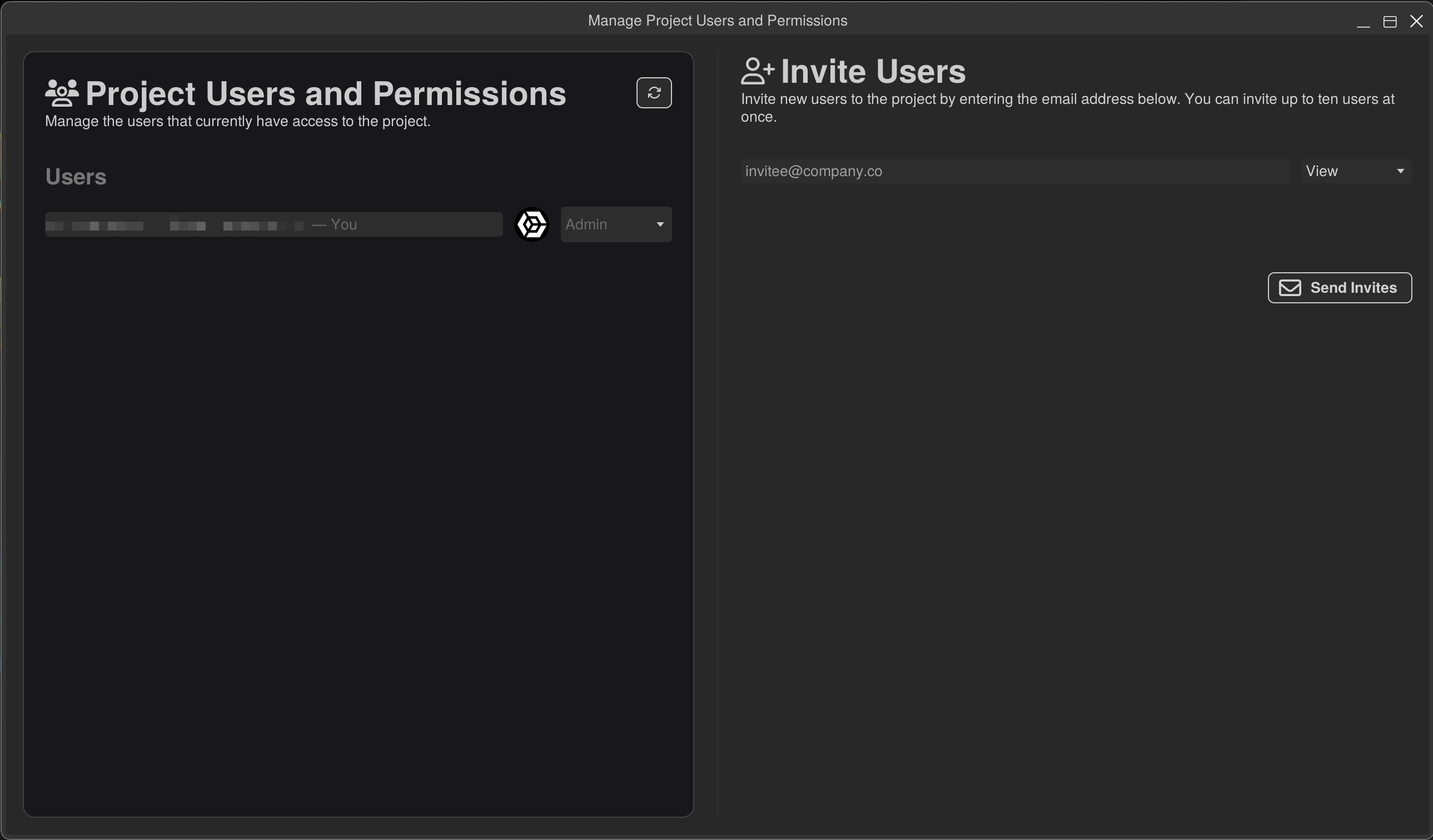
Invite Team Members
- In the editor, click blue Share button that is located in the Main Menu bar.
- Enter emails and setup permissions for each invited user:
- Admin: Full control (delete project, manage invites).
- Editor: Full edit access, including resources and scenes.
- Viewer: Read-only (great for stakeholders or QA).
- Invites send via email; recipients join instantly upon clicking the link.
-
Joining a Session
- Log in to RSX (desktop or browser).
- Open the shared project from the Home.
- Open a Scene from the Library window, you'll see a live participant list in the Scene Editor Toolbar.
¶ Editing Together
-
Collaborative Scene Editing: Changes to Scene Objects and Components in a Scene are automatically saved and versionend and replicate to your team in seconds. No "save and refresh" needed.
- Scene Presence List: The Scene Editor Toolbar contains a list of all teammates currently editing the current scene. Hover an avatar to show a popup containing user information. Right Mouse on an avatar to show additional options such as Focus on User or View as User to jump to a teammate's view.
- 3D Presence Indicators: Avatars appear in the Scene Editor, representing the most recently known location and orientation of collaborators. You will be able to see the viewport size of your teammate's accurately rendered in your viewport as a frustum.
- Selection Indicators: When your team selects or edits objects, their selection will become visible in your viewport, shaded by the avatar color. An icon will appear above the user's presence indicator to signal that the user is currently editing objects.
-
Chat & Annotations: Built-in resource-specific and global chat as well as spatial comments make it easy to iterate and collaborate.
-
Resource Locking: For sensitive edits (e.g., complex Carbon graphs), Right Mouse on the resource in the Library window → Lock (prevents others from editing until unlocked).
-
Offline Mode: Edit offline (syncs on reconnect); conflicts auto-resolve via operational transform (like Google Docs).
¶ Versioning and History
RSX embeds full version control directly into the editor, tracking every change at the object/resource level. No external tools are required! Everything is cloud-backed and visual.
¶ Core Versioning Features
- Auto-Commits: Every meaningful change (e.g., adding a component, editing a material) to a Scene or Resource triggers an auto-commit.
- Auto-Conflict Resolve: Scene and Code resources support automatic merging and conflict resource.
- Manual Conflict Resolve: In certain cases, a manual resolve is required. For instance, when two users reimport a Mesh at the same time. Such conflicts can be resolved using Theirs, or Mine. Right click the Resource in the Library → Resolve Conflict to choose how to resolve a conflicted resource. For Code Resources, the resolve can also be resolved using the Code Editor. Double Click the Code Resource in the Library and resolve the conflict using the IDE.
- Rollback & History: Right Click any Resource in the Library → Versioning... to open the Resource Versioning window. Revert to any point with one click.
- Reverting to a previous version will reactive the selected version as a new version for the Resource.
¶ Code Resources such as Shaders and TypeScript code
Editing resources such as @rsx.TypeScriptCode can be tricky in a collaborative environment that supports automatic. When a TypeScript file is saved in the IDE, the file is automatically marked for sync and replication. Conversly, RSX will automatically recompile the code in the background and update all objects without restarting the engine. This is one of the powerful features of RSX that makes iterating fast and seamless. However, it might be intrusive to designers working on the project.
RSX solves this issue by introducing two different synchronization modes for the editor. The Developer mode dynamically compiles code and hot-reloads it into the engine, all objects and components update automatically. In Designer mode, RSX disables dynamic code compilation of individual code files and only loads code that was manually commited by developers. This enables an uninterrupted workflow for designers that focus on scene building and design reviews.
Whenever RSX schedules a recompile of code, the Developer/Designer button will display a thick orange border. Once the compile finishes, the button will quickly flash to indicate that a hot reload occured. Certain actions such as simulating the active Scene, or performing project synchronization may temporarily prevent code compilation. In that case, the orange border will remain. Opening the Developer Window by clicking on the cogwheel next to the button, will display the reason for the delay. If code compilation fails, the Developer Window will display a compilation log.
¶ Best Practices for Teams
- Communication First: Use in-editor chat and Scene Comments chat for quick notes.
- Consistent Naming Conventions: Establish naming conventions for Resources, Scene Objects and Typescript code.
- Resource Sharing: Lock Resources during heavy edits; use tags for organization.
Collaboration in RSX feels natural and fast. No more "who has the latest file?" or "can you unlock the Scene?" and Teams report significantly increased iteration cycles compared to traditional engines.
¶ Next Steps
Fantastic! You're now familiar with fundamental collaboration and versioning workflows in RSX Engine. Take a minute now to invite your friends and colleagues. Remember, if they do not have an RSX account you can still invite them. They'll get a polite email with a prompt to sign up for your project.